



Website accessibility is your ally – it helps you exhibit your commitment to social responsibility and promoting inclusivity. On the other hand, neglecting Americans with Disabilities Act (ADA) compliance can end up in someone filing a lawsuit against your website for lack of accessibility or discrimination against people with disabilities.
While the ADA still does not explicitly mention websites – creating a gray area for website owners – no site is exempt from following web accessibility guidelines that adapt to the ADA requirements. If you’re wondering how to make your website ADA compliant, don’t panic.
In this article, I’ll share the ADA website compliance checklist employees at my Chicago web design agency use during every project. By following it, you’ll be able to create user-friendly websites and protect your business from potential lawsuits.
Table of Contents:
- Are You Pushing Away Website Visitors Without Realizing It?
- Why is Creating an ADA Compliant Website Crucial In 2024?
- ADA Website Compliance Checklist My Agency Is Using To Create Million-Dollar Experiences
- Can Your Website Be 100% ADA Compliant?
- It’s Your Turn To Put This ADA Website Compliance Checklist Into Action

Are You Pushing Away Website Visitors Without Realizing It?
Imagine a user visiting your business website for the first time; that user reached your site through an ad and is highly interested in your services.
However, this person is visually impaired and relies on a screen reader to access and understand your website content. Now, suppose you never paid attention to header tags, leaving them empty. The visually impaired user will hear the reading program say there’s a header present, but it won’t be able to read it due to the lack of header tags. That user will probably have a hard time understanding the organization of your content, and they’ll leave frustrated before considering becoming a customer.
That’s one example of the thousands I could give you. Business owners not incorporating ADA compliance tools and techniques into their websites and digital marketing strategies can push away potential clients without realizing it. If you notice leads abandoning your inbound marketing funnel at an early stage without reason, the lack of ADA compliance can be the cause.
Why is Creating an ADA Compliant Website Crucial In 2024?
In my WordPress ADA compliance guide, I’ve explained moral and business reasons for following website ADA compliance best practices. However, since this is a crucial topic that doesn’t get as much attention as some shinier aspects of web design, I thought it would be good to explain those reasons again.
Most Americans are familiar with the most crucial ADA compliances for physical stores, government buildings, and public parks. But for most, ADA compliance for websites is still an unknown territory. Nevertheless, adopting web accessibility guidelines is crucial when developing, updating, or managing a business website.
Is it mandatory for business websites to follow an ADA compliance checklist? When it comes to ADA web compliance, “mandatory” is a tricky term to define. However, different American courts have ruled that business websites are a place of public accommodation, leading to several lawsuits against sites that violated ADA civil rights laws for websites.
Incorporating ADA web accessibility guidelines will prevent potential customers from leaving your site due to accessibility compliance issues. You will also place your business as a responsible entity that takes people’s disabilities into account and promotes diversity. Lastly, making your site ADA-compliant is the best strategy to protect your business from potential lawsuits in the long term.
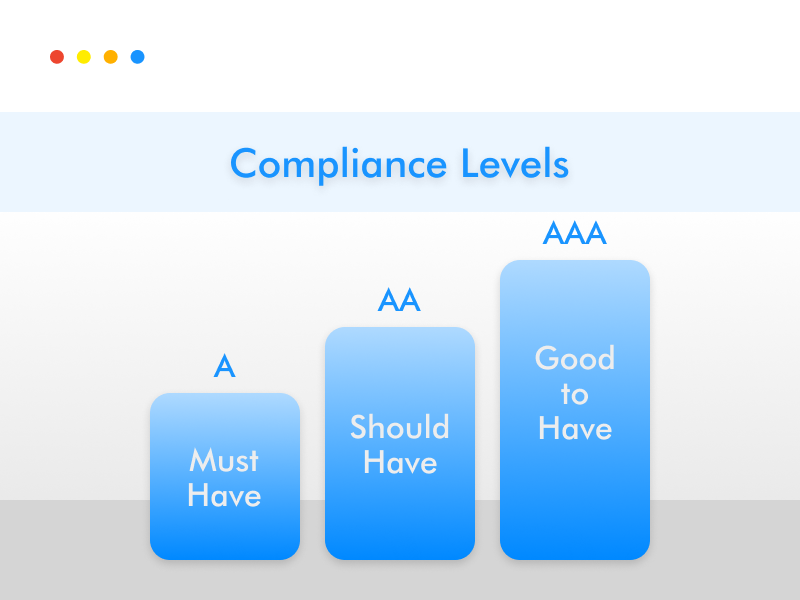
What are the ADA levels of compliance for a website?
The Web Content Accessibility Guidelines (WCAG) have three levels of compliance a business website can adhere to, each one progressively more challenging to reach.
A level
The most basic level of WCAG compliance. The criteria of the A level make it the easiest one to reach without making too many changes to your website content and structure. Images, titles, HTML tags, and resizable text are among the A-level criteria you must meet. Another example is that you can’t identify any element by colors (for example, “click on the red button to continue”).
AA level
To reach the AA level, your business website must meet the A-level criteria plus some extra rules, including text resizable up to 400% (without losing quality), audio and video content captions, and all forms accessible to all users. To make your website AA level, you must step up your game, for example, by making each landing page form accessible even for individuals who can’t use a mouse.
AAA level
This is the top WCAG compliance level a website can reach. Since this level’s standards are more challenging to reach, this place is typically reserved for government websites, banks, and specialist websites. Besides meeting all the criteria from levels A and AA, your site must have a way to navigate it by only using the keyboard. All your content must be accessible to individuals with cognitive disabilities. You can only use dark text colors on a light background or vice-versa (almost all colored text is a big “no”).
ADA Website Compliance Checklist My Agency Is Using To Create Million-Dollar Experiences
It’s finally time to explore my digital marketing agency‘s ADA compliance checklist and start identifying which areas of your website need adjustments to make the site accessible to everyone.
I divided the checklist into four steps so you could follow it more easily:
Step 1: Explore Web Content Accessibility Guidelines (WCAG) To Gain a Strong Foundation
Before embarking on a journey to make your website ADA-compliant, it would help to know the ins and outs of the WCAG (if you’ve skipped the previous section, I highly recommend scrolling back).
WCAG sets ADA compliance website standards with three different levels and helps you better understand how to create website content that is more accessible for differently-abled people.
Following that guideline is an excellent starting point. However, keep in mind that it’s being regularly updated. I tend to check it with my team every month just to make sure our client websites keep providing a smooth user experience.

Step 2: Create ADA Compliant Website Navigation
Make it possible for visitors to navigate your website in multiple ways
Ensuring visitors can navigate your site in multiple ways is crucial to creating an ADA-compliant website. For example, you can guarantee smooth navigation by making it easier to use the keyboard to move through your site. Prevent accessibility issues by checking your site and removing any keyword trap where users may get stuck on a page when using keyboard-only navigation.
Use clear and descriptive labels for navigation items
Add clear and descriptive labels for all the items on your website so users using keyboard navigation tools or screen readers can navigate more efficiently.
Add tooltips for icons
Tooltips are UI elements that can help make navigation smoother for users. A tooltip is usually a label text that appears when the user hovers or focuses on an element, such as an icon. The text provides short but valuable information about how the item works.
Include “Skip Navigation” to make your website more accessible to people using screen readers
Navigation can become a challenge for users with limited arm movement if your site requires taking several steps before reaching the important content. Skip navigation links allow visitors using keyboard navigation or screen readers to access the primary content quickly and easily. When working on your website design checklist, don’t forget about including skip navigation links.
Help users resolve errors when completing forms
To adhere form UI design best practices, remember to add features to help users resolve errors when filling out forms. A good example of this is error suggestions. Error suggestions are helpful for all users, but they are essential for individuals with cognitive disorders, difficulty typing, and visitors using text-to-speech (TTS) to enter their data.

Step 3: Optimize Media Files To Make Them More Accessible
Add alt text to all your media files
Not all your website visitors will be able to see media files such as images. Image alt text is the text you add to describe what an image or other non-text content is about. Adding alt text is critical for users who can’t load the media and visually impaired individuals who can’t see the image. You can quickly cross this item from the ADA website compliance checklist by using ADA WordPress plugins that scan all your media to ensure you provide text alternatives for each one of them.
Add text captions for videos
Video content is excellent for explaining your services to users and attracting new clients. Users with hearing impairments still want to be able to enjoy your video content and learn more about your brand. Overcome this obstacle and increase your site accessibility by adding closed captions to your website videos.
Ensure time limit functions are not restrictive
Individuals with disabilities such as dexterity impairments and cognitive limitations may find it challenging or impossible to make an action in a short length of time. Make sure to design not time-dependent functions so every user can easily complete the action. You can also tackle this accessibility issue by adding the option of turning off the time limit or customizing the time length.
Step 4: ADA Compliance For Headings and Titles
Establish a clear hierarchy for your headings
According to the WCAG website accessibility principles, your business website must be understandable. The best way to organize your site content is with the right headlines and titles. Don’t forget about removing empty header tags so visitors using screen readers can also understand your content hierarchy.
Step 5: ADA Website Compliance Checklist For Design and Aesthetics
Use easy-to-read fonts
The next item in this ADA web compliance checklist is using the correct fonts. Besides meeting the ADA standards, the fonts you choose can make or break your website. You want to avoid “fancy” fonts that are difficult to read. Instead, opt for simple, clearer fonts that users can easily digest.
Ensure your website provides excellent user experience on various devices and screen sizes
Mobile responsiveness has become crucial for user experience, SEO best practices, and meeting ADA requirements. Ensure your website adapts to different screen sizes so mobile and tablet users can have the best possible experience when visiting your site from those devices.
Use the appropriate color ratio
Another thing to keep in mind is how you use colors in your website. Color contrast may not seem a big deal, but it is for individuals with disabilities. People with impaired vision or color blindness may not distinguish a color combination, or the contrast can be painful to look at. Does that mean you have to change your entire website color scheme? No, but it’d help to be more mindful of the color contrast you use. The simplest solution is using white to separate colors and create contrast on your site.
Don’t rely solely on color to convey the message
This is a crucial item in any ADA checklist for websites and one of the most fundamental requirements. Low vision and colorblind users may be unable to distinguish colors; therefore, you should never rely solely on colors to convey a message.
Ensure elements in focus remain unchanged
Some visitors may need to zoom in on content to see it more clearly. When it happens, ensure the zoomed-in content doesn’t become distorted.
Avoid flashing visuals
Any strobing or flashing visuals can cause seizures; seizures are considered a disability, so make sure to remove all visuals that may negatively impact users with this condition.
Respect a visitor’s preference for dark and light modes
Some types of visual impairment make it difficult to look at bright screens or large chunks of white colors. Individuals with dyslexia or Irlen’s Syndrome sometimes find reading black text on a white background challenging. Ensure you have an accessible light/dark mode option to make your site more user-friendly.
Provide context-sensitive help when necessary
Forms or complex interactions can be challenging for some users. Ensure your site offers context-sensitive help when necessary. Context-sensitive help can also enhance your conversion rate optimization checklist, helping users avoid mistakes and move smoothly through your sales funnel.
Can Your Website Be 100% ADA Compliant?
Having a 100% ADA-compliant website is an impossible task. ADA guidelines are constantly improving and changing, and so are technologies and management solutions that allow us to create more accessible websites. Does that mean you should ignore ADA guidelines? Not at all; it only means website owners have to do their best to meet the latest accessibility standards as much as possible.
This ADA website compliance checklist is a good start; it covers all the bases for a level AA website. Today, there are plenty of technological solutions that can help you meet web accessibility guidelines more easily.
It’s Your Turn To Put This ADA Website Compliance Checklist Into Action
Is your website already ADA-compliant? If not, you have some work to do. Putting some effort into creating an accessible site will prevent differently-abled individuals from abandoning your website before checking your products or services and becoming clients. Besides, having a level AA compliance website will protect your business from potential lawsuits and expensive fines – an initial ADA violation can cost your company over $75,000.
Crossing each item of this ADA website compliance checklist guarantees you give all your visitors an enjoyable experience. Do you need help making your website accessible to all users? Schedule a call with me; I will audit your website and create a plan to remove any accessibility barriers and make it ADA-compliant.

Recent Post
Brian Dordevic
State Bar Rules on AI Use: A Lawyer’s Compliance Guide
READ MORE
Brian Dordevic
ADA Website Compliance Deadlines 2026: The Critical Compassion Gap
READ MORE
Brian Dordevic
Elements of a Good Website That Turn Clicks Into Cash
READ MORE